What a Smoke Test Verifies in a New Build
A smoke test is the shortest pass you can make over a freshly built version of an application, and it answers a single question: is this build stable enough to be worth testing properly?
It verifies that a new build's most critical functions work. That is a preliminary, shallow check, not a deep test of edge cases. You are not asking whether checkout handles a declined card, a currency mismatch, and a stacked coupon at the same time. You are asking whether a real customer can still get through checkout at all.
The distinction matters because a build can fail in ways that make every later test meaningless. If the application does not start, or nobody can sign in, then a two-hour regression pass will spend its first two hours rediscovering the same blocker. The smoke pass finds that blocker while the cost of stopping is still small.
What the pass does not tell you is just as important. It says nothing about whether edge cases in a form are handled, whether permissions hold for every role, whether performance survives a busy hour, whether a migration left the data intact, or whether a feature meets its acceptance criteria in detail. Treating a green smoke run as proof of quality is one of the most common ways teams misread it.
The Critical Paths a Smoke Test Should Cover
Choose checks by consequence rather than coverage. A path belongs on the smoke list when a failure there would make the release unusable for a real customer, or when a failure there would hide every other problem behind it.
For most web applications, that means one check in each of a few categories:
- Startup and the main entry screens render instead of an error page.
- Sign-in works for a dedicated test account, including the redirect back into the application.
- The primary value path completes: the one action the product exists to perform.
- A record can be created, saved, and read back.
- The main navigation reaches each top-level area.
- One external dependency responds, such as a payment sandbox, an email send, or an export.
An example set for an online store would be: the storefront loads without crashing, a test customer signs in, a search returns results and a product can be added to the cart, and the cart can reach checkout. That list is an example of the shape of a smoke pass, not an exhaustive standard; your own critical flows should replace it.
Critical path | What pass looks like | What you record |
|---|---|---|
Startup | Home page and one deep link render | Build ID, time, pass |
Sign-in | Test account reaches the account page | Account used, pass |
Search | Results return for a known product | Query used, pass |
Primary action | Product added, cart count updates | Pass or fail, one line of evidence |
Read-back | Cart page lists the item | Pass, note or capture |
Checkout entry | Checkout form loads with a total | Pass or blocked |
One dependency | Sandbox payment authorises | Pass or error text |
Keep the list short enough that one person can run it before every build without resenting it. A smoke pass that grows into a regression suite stops being run, and a list nobody runs catches nothing.
Running the Smoke Pass Without Any Tooling
A spreadsheet and a browser are enough. The method matters more than the software:

- Write the checks once, as observable statements. "A test account can sign in and reach the account page" is checkable; "authentication works" is not.
- Fix the pass criteria before you run anything. Decide what you will see on screen when a check passes, so the outcome does not depend on how generous you feel at the time.
- Keep a dedicated test account and test data. A smoke result should not depend on a colleague's leftover order or a product that happens to be sold out.
- Run in a clean browser session. A fresh profile or private window removes the stale cookie that makes a broken sign-in look healthy.
- Record each check as you go, not from memory afterwards. One row per check, with the build identifier written at the top of the page.
- Capture the evidence for any failure. The error text, the step number, and what you expected to see are worth more than the word "failed".
- Re-run the whole list after a fix. A build is only as strong as its weakest critical path, so a partial re-run can hide a new break elsewhere.
A filled-in record for one check might read: "Build 2417, check 4 of 7, add to cart. Expected the cart count to show 1. Actual count unchanged, the add-to-cart request returned a server error, product was in stock. Fail."
That single line tells the next person what broke, where, and how to reproduce it, without a meeting. The written record is the durable part of the practice; the clicking is temporary.
A Worked Browser Run When the Cart Check Fails
Here is what a recorded smoke run looks like when a critical path breaks in the middle. The store, the build, and the numbers are illustrative; the shape of the record is what to copy.
Step | Result | Note |
|---|---|---|
1. Open the storefront home page | Pass | Hero and product grid render |
2. Sign in with the smoke test account | Pass | Redirect to account page, name shown |
3. Search for a product and open it | Pass | Results return, product page loads |
4. Add the product to the cart | Fail | Cart count stays at 0, request returns a server error |
5. Open the cart | Blocked | Depends on step 4, nothing to inspect |
6. Reach checkout | Blocked | Checkout cannot start from an empty cart |
The failure explanation is where the value sits. "Add to cart failed" is a status. "The cart count stayed at 0 and the add-to-cart request returned a server error for a product that was in stock" is an explanation a developer can act on and a release owner can reason about.
Read that explanation by asking two questions. First, was the check itself wrong: the wrong button, an out-of-stock item, a test account without the right permission? If so, fix the check and re-run, because the build has not been judged yet. Second, did the application break where a real customer would break? A server error from the cart service on an in-stock product is an application failure, and the build goes back to the team.
Pass the Build or Block Deeper Testing
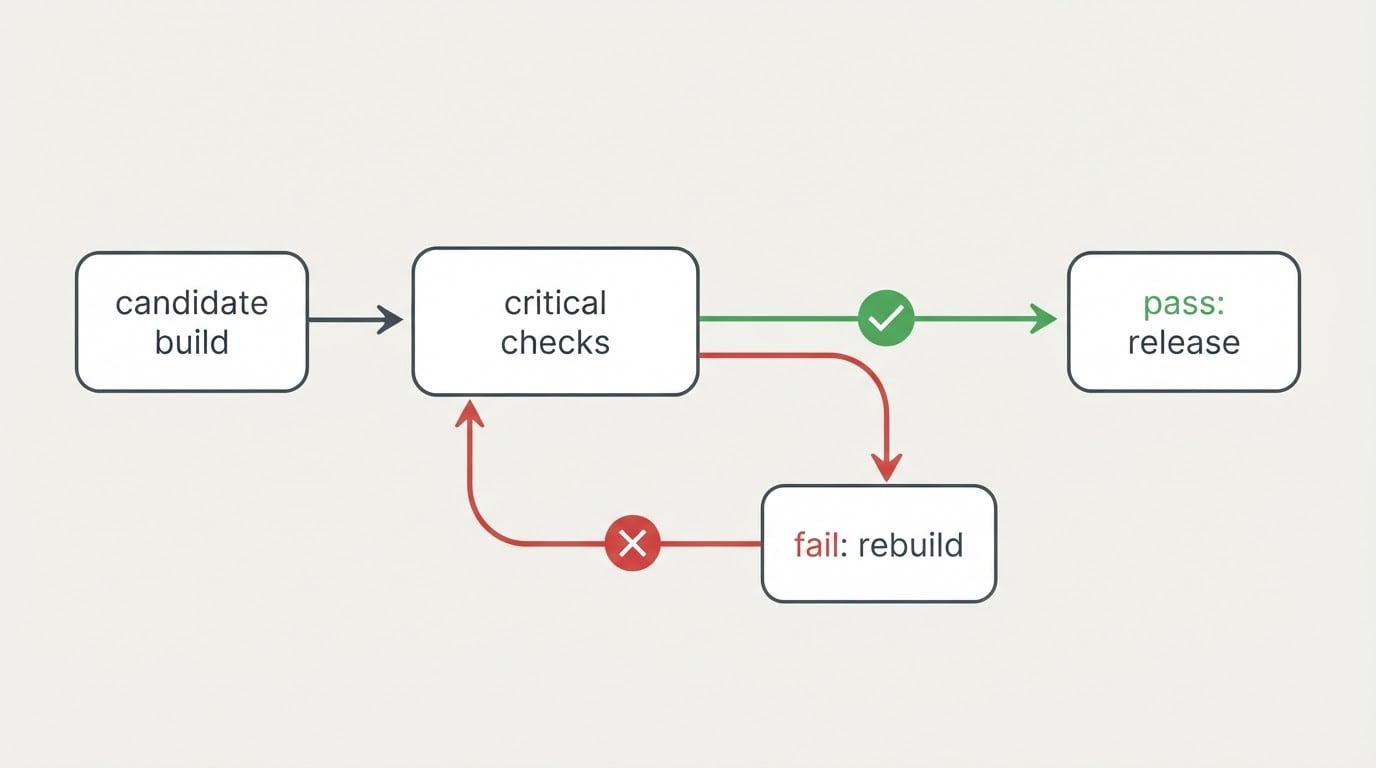
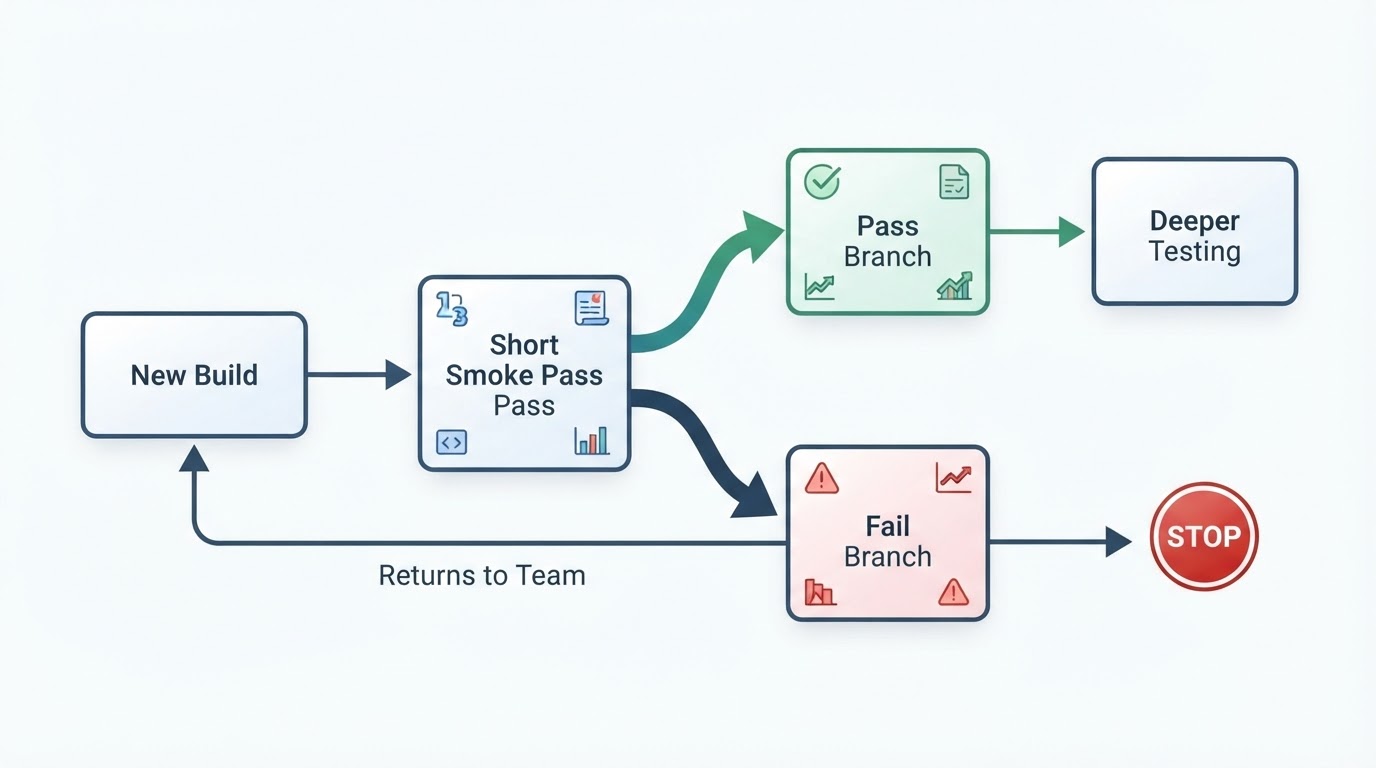
The decision rule is deliberately blunt. If every critical check passes, the build is stable enough for deeper testing to begin. If any critical check fails, the build is rejected and deeper testing is blocked until the development team addresses the failure and a re-run passes.
Outcome | What it means | Next action |
|---|---|---|
Every critical check passes | The build is stable enough to test further | Start deeper testing |
One or more critical checks fail | The build is rejected | Stop, fix, re-run the whole list |
Failure traced to an outdated check or stale data | The build was never judged | Fix the check, then re-run |
No usable verdict, environment unreachable | The build was never judged | Fix the environment, then re-run |
The bluntness is the point. A failed smoke test rejects the build and blocks deeper testing until the development team addresses it; a smoke pass with exceptions is not a smoke pass, it is a decision to find out in production. The bottom two rows matter just as much, because a broken check or an unreachable test environment produces no verdict at all, and the honest answer is to re-run rather than to record a pass.
Recording the block explicitly also gives the release conversation a fixed starting point. The build is not waiting on someone's opinion about risk; it is waiting for a critical path to work.
Where the Smoke Pass Ends and Deeper Testing Begins
The smoke pass ends when the last critical check has a result. What follows is a different question: does this build behave correctly across the cases that matter? That work covers validation rules, permission boundaries, empty and malformed data, performance, accessibility, and the combinations a real customer will eventually try.
Designing that fuller regression suite is its own project with its own scope; it is not what a smoke test is for. The overlap is only in ordering: the smoke pass decides whether the fuller testing is worth starting at all.
A few habits quietly turn the pass into something it is not:
- Letting the list grow until it takes an afternoon, so it gets skipped under release pressure.
- Reading a green smoke run as release approval rather than permission to test further.
- Recording pass or fail with no build identifier, so the record cannot answer the first question anyone asks.
- Rewriting the checks on every build, which makes results impossible to compare over time.
- Retrying a failed check until it goes green, then reporting the green.
Each of these removes the one property that makes a smoke test useful: the same short list, run the same way, against every build.
Where a Recorded Browser Run Fits
A manual list works because it is cheap to start and needs no setup. It gets harder to trust once the same checks run several times a day, or once more than one person runs them and each writes the record a little differently. At that point the value of the run depends on the record being consistent, and consistency is what repeated execution gives you.
BuniOD is one option aimed at that part of the job. As its product documentation describes it, a failed run reports the exact step or check that failed and adds a written explanation of why, framed as a choice between a bug in the application and a scenario that needs updating, rather than leaving you with a stack trace. That explanation sits next to the same run's step screenshot and logs, so nobody has to reproduce the failure to understand it, and failed runs are not retried automatically, so a red result stays the real result.
None of that replaces the checklist or the decision rule. It replaces the part where someone reconstructs what happened, which is usually the slowest part of a failed smoke pass.
The Rule Worth Keeping
A smoke test is not a small regression suite and not a release sign-off. It is a short, shallow check of a new build's most critical functions, run before anything deeper, so that testing effort goes to builds that can actually carry it.
Write the list once. Fix what pass means. Run it against every build, in full, and write down each result. Then let the answer stay blunt: all critical paths pass, keep going; one fails, stop until it works.